SuperBOL Studio
SuperBOL Studio brings COBOL into the modern developer environment with a VSCode extension powered by a Language Server Protocol (LSP). Modern development for COBOL.
Modern IDE for COBOL
LSP Server
Advanced COBOL code analysis powered by a Language Server Protocol engine for intelligent editing.
Code Coverage Visualization
Visualize test coverage directly in your editor to identify untested code paths.
Graphical Project Visualization
Navigate complex COBOL projects with graphical representations of code structure and dependencies.
Enhanced SQL Support
Full SQL support within COBOL code for modern database integration workflows.
Develop Faster, With Confidence
SuperBOL Studio reduces errors and increases productivity, giving COBOL teams a modern IDE experience aligned with current software practices.
IntelliSense & Auto-Completion
Intelligent code suggestions for COBOL keywords, user-defined data items. IntelliSense accelerates coding and reduces syntax errors.
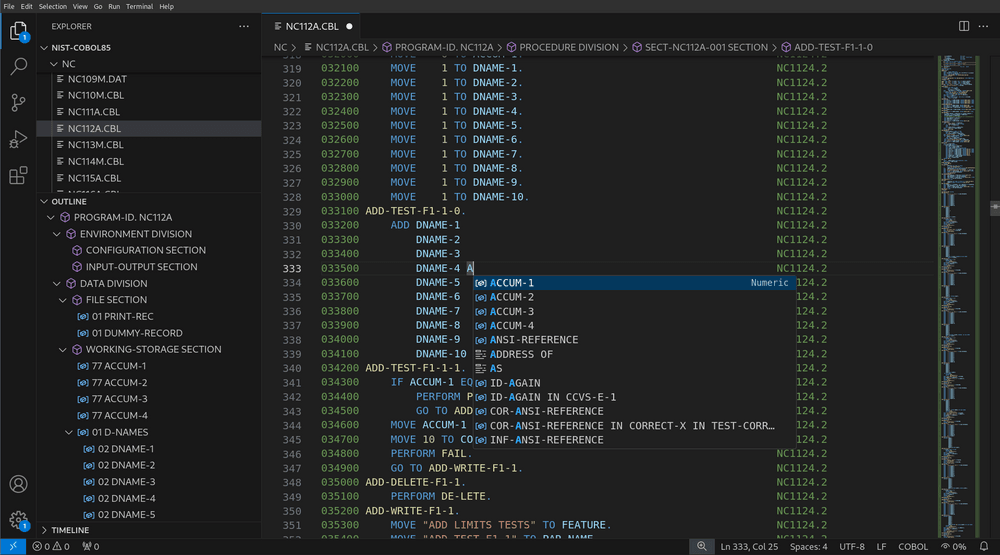
IntelliSense & Auto-Completion
Intelligent code suggestions for COBOL keywords, user-defined data items. IntelliSense accelerates coding and reduces syntax errors.
Go to Definition
Jump directly to the definition of data items with F12. Navigate your codebase effortlessly, even across multiple files and copybooks.
Peek Definition in Copybooks
Preview definitions without leaving your current view using Ctrl+Shift+F10. Perfect for quickly checking copybook contents and source text replacements.
Hover Information
Hover over symbols to see copybook contents, source text replacements, and reference information instantly. No need to navigate away from your code.
SuperBOL Studio in production

Frequently asked questions
What is SuperBOL Studio?
SuperBOL Studio is a modern COBOL development environment built as a VSCode extension. It uses the Language Server Protocol (LSP) to provide advanced code analysis, navigation, and diagnostics for COBOL developers.
Which COBOL dialects does SuperBOL Studio support?
SuperBOL Studio supports 20+ COBOL dialects including IBM, MicroFocus, and other major vendor formats, so it works with your existing codebase regardless of dialect.
Is SuperBOL Studio free?
SuperBOL Studio is available as a free download. It is open-source and integrates with GnuCOBOL and the complete SuperBOL suite for a comprehensive COBOL development experience.
Does SuperBOL Studio support SQL?
Yes. SuperBOL Studio includes enhanced SQL support for database integration, helping COBOL developers work with embedded SQL statements directly within the editor.
Can I visualize code coverage with SuperBOL Studio?
Yes. SuperBOL Studio provides code coverage visualization directly in the editor, along with graphical project visualization to help you understand and navigate large COBOL codebases.